New technology/product release spree that Microsoft seems to be in lately has come to its high with the Professional Developers Conference (PDC) 2008 concluding today at Los Angeles, USA.
It's been not very long since Microsoft has released .NET 3.0/3.5 with completely new technologies like WPF, Silverlight, WCF, and so on. Recently they released the next versions of them (Silverlight 2, and .NET 3.5 SP1) and PDC saw the announcement of Silverlight 2 Tool Kit and WPF Tool Kit.
Other Products/Technologies that were previewed at PDC include Windows 7, Windows Azure, and Visual Studio 2010 / .NET 4.0.
Windows 7 (formerly codenamed Blackcomb and Vienna) is the next version of Microsoft Windows and the successor to Windows Vista. I tried out the developer preview version of Windows 7 Ultimate (Build 6801) and found it not much different from Windows Vista in look and feel. But under the hood, it includes a number of new features, such as advancements in touch, speech, and handwriting recognition, support for virtual hard disks, improved performance on multi-core processors, improved boot performance, and kernel improvements. Read more here.
Windows Azure is Microsoft's operating system for the cloud. The Azure Services Platform combines cloud-based developer capabilities with storage, computational and networking infrastructure services, all hosted on Microsoft's servers. Read more here.
The next version of Visual Studio is 2010 with .NET Framework 4.0. Read more here.
I wonder why Microsoft is still continuing the calendar year naming for the versions of Visual Studio while they discontinued it for Windows. Anyway, as developers in Microsoft technologies, there is no end to our continuous learning and re-learning cycles.
Thursday, October 30, 2008
Wednesday, September 17, 2008
Microsoft Live Mesh
Live Mesh is a new software product from Microsoft that was released to public few months back. It helps in synchronizing files and folders that are used across different computers and devices.

When you work on a project or document on more than one computer (say one at home and one at work), you often land into this issue of keeping the files synchronized. Live Mesh solves this issue by connecting all the devices together, so that you don’t have to manually copy and keep the latest files by yourself.
To use Live Mesh go to http://www.mesh.com and sign in using a Windows Live ID (hotmail email address is good enough). After that, add a device (say your work computer) to the Mesh by installing the Live Mesh client software. Now you can choose any folder to be a Live Mesh Folder and the files in that folder will be automatically synchronized with other devices you have added to your Mesh.

Live Mesh also has a Live Desktop as part of the connected devices that you can access from any other computer (say internet café) through a browser. This Live Desktop shows all Mesh Folders and files and it is even possible to remotely connect to a computer.
Another useful feature is the ability to share a Mesh Folder with a remote user. I played with this feature today and found the updates I make to a file are visible to the shared user within few seconds.
Microsoft is releasing development APIs and SDKs as well, for developers who can make use of the Live Mesh platform to create applications that are accessible across multiple devices. Live Mesh is now in Tech Preview state (not even Beta) and Mobile and Mac support are also on its way.

When you work on a project or document on more than one computer (say one at home and one at work), you often land into this issue of keeping the files synchronized. Live Mesh solves this issue by connecting all the devices together, so that you don’t have to manually copy and keep the latest files by yourself.
To use Live Mesh go to http://www.mesh.com and sign in using a Windows Live ID (hotmail email address is good enough). After that, add a device (say your work computer) to the Mesh by installing the Live Mesh client software. Now you can choose any folder to be a Live Mesh Folder and the files in that folder will be automatically synchronized with other devices you have added to your Mesh.

Live Mesh also has a Live Desktop as part of the connected devices that you can access from any other computer (say internet café) through a browser. This Live Desktop shows all Mesh Folders and files and it is even possible to remotely connect to a computer.
Another useful feature is the ability to share a Mesh Folder with a remote user. I played with this feature today and found the updates I make to a file are visible to the shared user within few seconds.
Microsoft is releasing development APIs and SDKs as well, for developers who can make use of the Live Mesh platform to create applications that are accessible across multiple devices. Live Mesh is now in Tech Preview state (not even Beta) and Mobile and Mac support are also on its way.
Thursday, September 11, 2008
Desklighter Update: Beta 1.1 with 64 bit support
Thanks to one user (aquaseal) who reported that Desklights are not displaying the Silverlight content on 64 bit systems. We have fixed this issue and a new version of Desklighter (Beta 1.1) is now available for download from Blendables Labs.
 Another update we released with this version is the icon feature for Desklights. Earlier, Desklights were showing the default windows executable icon and now it is changed to a Desklight exe icon.
Update: http://ctlabs.blogspot.com/2009/09/desklighter-update-beta-2-with-more.html

Update: http://ctlabs.blogspot.com/2009/09/desklighter-update-beta-2-with-more.html
Wednesday, September 03, 2008
Google Chrome - Browser from Google
Today, Google released their new product, Google Chrome, an interesting internet browser. As one would expect from Google, it is much faster, compact and less cluttered.
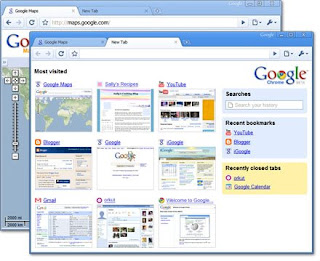
Like most other Google products, Chrome is also released as Beta version, but I would assume that it will be much stabler than a Release Candidate product from Microsoft. :)

As Google have built this browser from scratch keeping in mind today's Rich Internet Application scenarios, there are several architectural differences from other popular browsers. For example, each tab opened in the browser runs as a separate process, allowing one to close a hung tab without affecting other open tabs.


The memory used by each site and plug-ins can be seen through its task manager... so we know who is eating up more resources, and can kill them instantly. Read more about such technical details as a comic book here.

Google Chrome has a mix of useful features from both Internet Explorer 8 and Fire Fox 3. One such feature is incognito tab, where you can browse a site without leaving any trace or history.
After installing Google Chrome today, I immediately fell in love with that. In fact, I have changed my default browser from IE to Chrome. I may still continue to use Fire Fox, as it has got many useful extensions and plug-ins, until they are available in Chrome.

Many sites didn't work as expected in Chrome as they didn't understand this new browser. Windows Live Mail complained, but let me get in with the older version. Even Blogger complained "Your browser's cookie functionality is disabled", but on the second attempt it was fine. The Silverlight installation page displayed "This Web browser or operating system may not be compatible with Silverlight.". But I was able to view a Silverlight content without any issues.

Like most other Google products, Chrome is also released as Beta version, but I would assume that it will be much stabler than a Release Candidate product from Microsoft. :)

As Google have built this browser from scratch keeping in mind today's Rich Internet Application scenarios, there are several architectural differences from other popular browsers. For example, each tab opened in the browser runs as a separate process, allowing one to close a hung tab without affecting other open tabs.


The memory used by each site and plug-ins can be seen through its task manager... so we know who is eating up more resources, and can kill them instantly. Read more about such technical details as a comic book here.

Google Chrome has a mix of useful features from both Internet Explorer 8 and Fire Fox 3. One such feature is incognito tab, where you can browse a site without leaving any trace or history.
After installing Google Chrome today, I immediately fell in love with that. In fact, I have changed my default browser from IE to Chrome. I may still continue to use Fire Fox, as it has got many useful extensions and plug-ins, until they are available in Chrome.

Many sites didn't work as expected in Chrome as they didn't understand this new browser. Windows Live Mail complained, but let me get in with the older version. Even Blogger complained "Your browser's cookie functionality is disabled", but on the second attempt it was fine. The Silverlight installation page displayed "This Web browser or operating system may not be compatible with Silverlight.". But I was able to view a Silverlight content without any issues.
Monday, September 01, 2008
Desklighter – carry the light along
Today is a great day for me. At IdentityMine, I’ve been working on a software tool named as ‘Desklighter’ since some time back and now it is released to public as a free beta version through our product website’s labs section at http://blendables.com/labs/Desklighter/Default.aspx.
 Desklighter is a windows utility that can convert a Silverlight application into a standalone desktop application. The output from Desklighter is a single executable file that can display the Silverlight content on windows desktops without requiring a hosting server or a browser. Desklighter enables users to carry a Silverlight application off the web to wherever they need it.
Download Desklighter from here and try converting your Silverlight XAP files into windows exes.
The idea of taking the Silverlight application off the web into a portable single file executable opens up a whole new playing field. Now you will be able to carry your favorite Silverlight games from the web in a USB Flash drive to your friends who are not connected to internet. You can now share your exciting ideas materialized in Silverlight without having to worry about the hosting infrastructure. Your flashy Silverlight demo can now be taken to your customer for showcasing during a presentation. You can distribute your stylish e-brochure done in Silverlight in CDs to whomsoever you want. The possibilities are endless.
A Desklight (the EXE created using Desklighter) need to have the Silverlight plug-in (currently Silverlight 2 Beta 2) installed to run on windows desktops. Below is a screen shot of a sample Desklight. You can download more samples from http://sites.google.com/site/silverlightoffline.

Information about a Desklight including the Desklighter version used to create it can be found when executed from a command line with 'info' as the argument.

Another available command line argument is ‘debug’, which displays the Desklight’s server information while the Silverlight content is getting served. Use this if you see some issues while running a Desklight to know what is happening behind the screens.

Read the complete technology story behind Desklighter here.

The name ‘Desklighter’ was chosen to represent Desktop + Silverlight. My colleague Hariprashanth was the one who created all the graphics work for Desklighter. The logo is made up of four ‘D’s (representing Desklighter) with the windows logo colors (representing desktop). Hari did an excellent work in giving it a stylish look.
I would like to thank all my colleagues here at IdentiyMine for extending their support and providing valuable feedback during the development of Desklighter. The wish list for the next version of Desklighter is growing, thanks to the innovative ideas from them.
Please let us know what you think about this tool, and what you would like to see in its future versions.
Update - New Version Released: http://ctlabs.blogspot.com/2009/09/desklighter-update-beta-2-with-more.html

Download Desklighter from here and try converting your Silverlight XAP files into windows exes.
The idea of taking the Silverlight application off the web into a portable single file executable opens up a whole new playing field. Now you will be able to carry your favorite Silverlight games from the web in a USB Flash drive to your friends who are not connected to internet. You can now share your exciting ideas materialized in Silverlight without having to worry about the hosting infrastructure. Your flashy Silverlight demo can now be taken to your customer for showcasing during a presentation. You can distribute your stylish e-brochure done in Silverlight in CDs to whomsoever you want. The possibilities are endless.
A Desklight (the EXE created using Desklighter) need to have the Silverlight plug-in (currently Silverlight 2 Beta 2) installed to run on windows desktops. Below is a screen shot of a sample Desklight. You can download more samples from http://sites.google.com/site/silverlightoffline.

Information about a Desklight including the Desklighter version used to create it can be found when executed from a command line with 'info' as the argument.

Another available command line argument is ‘debug’, which displays the Desklight’s server information while the Silverlight content is getting served. Use this if you see some issues while running a Desklight to know what is happening behind the screens.

Read the complete technology story behind Desklighter here.

The name ‘Desklighter’ was chosen to represent Desktop + Silverlight. My colleague Hariprashanth was the one who created all the graphics work for Desklighter. The logo is made up of four ‘D’s (representing Desklighter) with the windows logo colors (representing desktop). Hari did an excellent work in giving it a stylish look.
I would like to thank all my colleagues here at IdentiyMine for extending their support and providing valuable feedback during the development of Desklighter. The wish list for the next version of Desklighter is growing, thanks to the innovative ideas from them.
Please let us know what you think about this tool, and what you would like to see in its future versions.
Update - New Version Released: http://ctlabs.blogspot.com/2009/09/desklighter-update-beta-2-with-more.html
Subscribe to:
Posts (Atom)